HubSpot AEO Grader Review: What the Score Means (and What's Next)
We ran HubSpot's free AEO Grader (now AI Search Grader) five times, including on a made-up brand. Here's how the 100-point score is built, what your number really means, where the tool stops, how paid HubSpot AEO differs, and a 30-day plan for what to do next.
On this page
On this page
The HubSpot AEO Grader, now called AI Search Grader, is a free tool that asks three AI models what they know about your brand and scores each one out of 100. It's a useful first look, not a tracking tool.
This review shows what we entered, how the score is built, what a made-up brand scored (it surprised us), where the grader stops, how paid HubSpot AEO differs, and a 30-day plan for what to do next.
Is the HubSpot AEO Grader worth using?
Yes, as a free first check. In about 30 seconds, and without giving an email address, you see how three AI models rate your brand on five dimensions.
What it's good for:
- A quick baseline before you ask for budget or pick a tool.
- A cheap competitor check, since it accepts any brand name.
- Spotting a weak area, like low recognition or a flat tone, on a specific engine.
- Internal buy-in. Three scores from a well-known vendor are easy to put in a slide.
What it can't do:
- Track progress. HubSpot itself calls the grader "a single moment in time."
- Show the questions it asked or the sites AI cited (the free scorecard has neither).
- Check Claude, Google AI Overviews or AI Mode.
What is the HubSpot AEO Grader?
The HubSpot AEO Grader is HubSpot's free, one-time check of how AI models describe a brand. HubSpot now calls it AI Search Grader, the old AEO Grader address redirects there, and HubSpot's menus still use the old name.
It sits next to HubSpot AEO, the paid tracker HubSpot launched in April 2026. TechTarget's report on the launch says the technology came from XFunnel, which HubSpot bought in late 2025. If AEO is new to you, start with our explainer on what answer engine optimization is.
| Question | Answer |
|---|---|
| Cost | Free, no account |
| What you enter | Company name, location, product or service, industry |
| Website URL needed | No, it doesn't look at your site |
| AI models checked | GPT-5.4 mini (OpenAI), Perplexity, Gemini |
| What the answers draw on | Training data for ChatGPT and Gemini, live search for Perplexity (per HubSpot) |
| Score | Out of 100 for each engine, across five weighted dimensions |
| Time to results | About 25 to 35 seconds in our runs (HubSpot says under two minutes) |
| Email needed to see scores | No |
| Email needed for the full report | Yes, plus name, role, phone, website and company size |
| Tracking over time | No |
How to use the HubSpot AEO Grader, step by step
Running the grader takes four fields and one click. Here's the flow as of October 2026.
- Find the AI Search Grader by searching "HubSpot AI Search Grader."
- Enter your company name the way customers say it, since that's the name the models get asked about.
- Add a location. HubSpot's tooltip says a city, country, region or global all work.
- Describe your product or service in a few words, "as your customers would," in HubSpot's words, such as "email marketing software."
- Enter your industry, such as retail, hospitality or manufacturing.
- Submit. Our scores arrived one engine at a time, all three within about 30 seconds.
- Save the results link. The URL holds your inputs, so you can share or reopen it, and an "Update" link lets you edit them.
- Decide on the full report. It sits behind a form asking for first and last name, email, role, phone, website and company size, all required.
- Run two or three competitors with identical location, product and industry wording so the numbers compare.
How is the HubSpot AEO Grader score calculated?
Each engine gets its own score out of 100, built from five weighted dimensions, and sentiment alone is worth 40 points. HubSpot publishes the weights on the grader page and calls the scoring "deterministic," with "schema validation and retry logic."
HubSpot's page mentions a composite score, but our results page showed one score per engine and no combined number. It also says "Brand Sentiment" and "Market Score" where the grader page says "Sentiment Results" and "Market Competition."
| Dimension | Max points | What HubSpot says it measures | OpenAI | Perplexity | Gemini |
|---|---|---|---|---|---|
| Brand Sentiment | 40 | Overall tone, tone by topic, and how credible the sources behind it are | 20 | 20 | 31 |
| Presence Quality | 20 | Mention depth, source quality and how complete the information is | 5 | 9 | 9 |
| Brand Recognition | 20 | How widely and specifically the models know your brand | 4 | 4 | 8 |
| Share of Voice | 10 | Your estimated share of category voice, plus a rank bonus | 1 | 1 | 1 |
| Market Score | 10 | Category role (Leader, Challenger, Niche Player) and innovation perception (Innovator, Disruptor, Traditionalist) | 6 | 6 | 6 |
| Total | 100 | Sum of the five | 36 | 40 | 55 |
The weights show what the grader cares about. Eighty points cover how AI describes you, and only 20 cover where you stand against competitors.
What are the limits of the HubSpot AEO Grader?
The grader measures perception once, from questions you can't see, on three engines. Those are fair trade-offs for a free tool, but they limit what you should decide from it.
- It's a snapshot. HubSpot's AEO page calls it "a single moment in time," and repeating our inputs returned the exact same scores.
- You don't see or choose the questions. HubSpot says it "runs pre-set queries on your behalf." Our own research found that growing a tracked set from 10 to 100 questions cut variation in reported brand coverage by about 73%, so a small fixed set is a rough guide.
- Three engines only. It checks GPT-5.4 mini, Perplexity and Gemini, not Claude, Microsoft Copilot, or Google AI Overviews and AI Mode. A small OpenAI model may not match what your buyers see in ChatGPT.
- Training data for two of the three. HubSpot says ChatGPT and Gemini answer from training data here, so new pages and press may not register until those models update.
- No sources and no site check. It takes no URL, and neither the free scorecard nor HubSpot's description of the full report lists which sites AI cited.
- Contact details for the full report. Scores are free to see, but the written analysis and suggestions need the form.
How to interpret your HubSpot AEO Grader score
Read each engine's score against a floor of roughly 30, not zero, and focus on the weakest dimension rather than the total. Here's how we'd act on each range, based on our five runs.
| Score per engine | Label we saw | What it likely means | What to do |
|---|---|---|---|
| Under 35 | This score has room for growth | The model knows little or nothing specific; our made-up brand scored 29 to 33 | Fix the basics: one consistent brand description, crawler access and a few trusted third-party profiles |
| 35 to 55 | You're on the right track | You're known but thinly described; recognition and presence are low | Build category proof: independent reviews, comparisons, and clear product and use-case pages |
| 56 to 78 | Not seen in our runs | You're recognized, with one or two weak dimensions | Fix the lowest dimension first and start tracking real buyer questions |
| 79 and up | This score is great | You're well known and well described; HubSpot scored 79 to 81 | Protect accuracy and tone, and track share of voice by question against named rivals |
HubSpot doesn't publish the cut-offs between its labels, so treat our ranges as a guide. Then look at your weakest dimension:
- Low Brand Recognition: get covered by sources AI already trusts, and use the same name and one-line description everywhere.
- Low Presence Quality: publish specific facts about who you serve, what you do, pricing and proof.
- Low Brand Sentiment: read what AI actually says. If facts are wrong, follow our guide to correcting AI hallucinations about your brand.
- Low Share of Voice or Market Score: start with comparison pages and independent "best of" coverage.
Don't mix up the two HubSpot scores: The grader's score out of 100 is not the visibility score in paid HubSpot AEO. HubSpot defines that one as the share of tracked answers that mention you, so 7 mentions in 10 answers is 70%, with above 67 called high and below 34 called low.
HubSpot AEO vs the free AEO Grader: what does the paid tool add?
HubSpot AEO is the ongoing version: you choose the prompts, it runs them daily, and it shows citations and recommendations. As of October 2026 it costs $50 a month, or $45 a month paid annually, and HubSpot labels it beta.
According to HubSpot's product, pricing and help pages, it includes:
- 25 tracked prompts, each run daily on ChatGPT, Gemini and Perplexity, for about 2,500 answers a month. You can buy more.
- A 28-day free trial with no credit card and no other HubSpot subscription required.
- Brand visibility, sentiment and competitor share of voice, with sentiment scored from -100 to +100.
- Prompt suggestions based on your brand, competitors, industry and buyer journey.
- Citation analysis of the domains, pages and content types behind AI answers.
- Prioritized recommendations, such as a new blog post, a page update, a LinkedIn post or outreach to third-party sites.
AEO also comes with Marketing Hub Professional, listed from $800 a month plus a required $3,000 onboarding fee, with the same 25 prompts. Enterprise, from $3,600 a month plus $7,000 onboarding, includes 50 prompts and 5,000 answers a month. HubSpot's help article shows blog post generation and CRM-based prompt suggestions only in those plans, not in standalone AEO.
It covers the same three engines as the grader, so Claude and Google's AI features stay out of view. HubSpot also tells new users to "expect the first few weeks to be directional."
What to do next: a 30-day plan after your grader score
Your score is a starting point. This plan turns it into work you can finish in a month, whichever tool you pick afterward.
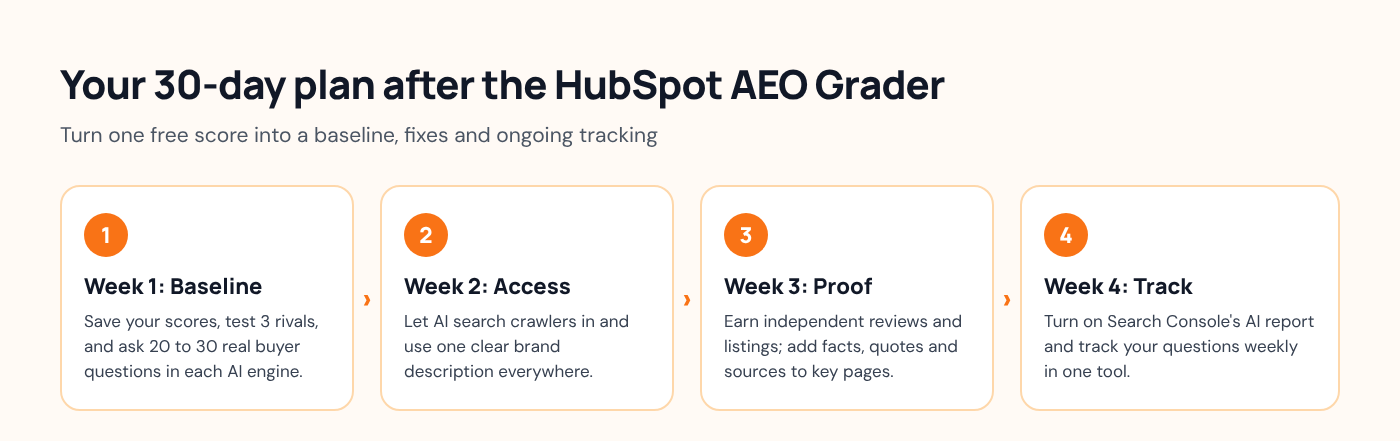
Week 1: Set a real baseline
- Screenshot your results and run three competitors with identical inputs.
- Write 20 to 30 questions buyers actually ask, like "best [category] for [audience]." Our free Query Fanout tool suggests related searches AI might run behind each one.
- Ask them in ChatGPT, Perplexity, Gemini, Claude and Google AI Mode. Note who gets named and which sites get cited.
- List every wrong fact about you. Those get fixed first.
Week 2: Make sure AI can reach and understand you
- Check that robots.txt lets AI search crawlers in. OpenAI's crawler documentation says sites that block OAI-SearchBot won't be shown in ChatGPT search answers, and Perplexity's crawler docs say PerplexityBot surfaces and links sites in its results. Our free AI Crawler Checker shows the rule behind each decision.
- Write one plain sentence about what you do and who it's for, and use it on your homepage, About page and every profile.
- Skip special tricks for Google. Its guidance on AI features says there are no extra requirements or special schema needed to appear in AI Overviews or AI Mode.
Week 3: Earn independent proof
- Go where AI already looks. In our research on where new brands earn AI authority, independent sources made up 67.7% of ChatGPT and 77.6% of Google AI citation activity, and brand-owned pages just 1.1% and 0.5%.
- Get listed or reviewed on the directories, review sites and roundups that showed up in your Week 1 answers.
- Add specific numbers, quotes and sources to your two or three most important pages. The GEO paper presented at KDD 2024 found these raised visibility in AI answers, while keyword stuffing scored below the unchanged baseline.
Week 4: Start tracking, then re-test
- Open Google Search Console's generative AI performance report, which shows your impressions in AI Overviews and AI Mode by page, country and device.
- Pick a tracker for your 20 to 30 questions (options below) and set a weekly check-in.
- Don't judge the month by the grader. Identical inputs gave us identical scores, and new wording shifts the score on its own.
Options for ongoing AI visibility tracking
To see whether your work is paying off, you need a tool that repeats the same questions over time. Here are the main options as of October 2026.
| Option | Cost | AI engines covered | Repeats over time | Shows cited sources | Helps do the work |
|---|---|---|---|---|---|
| HubSpot AI Search Grader | Free | OpenAI, Perplexity, Gemini | No | Not in the free scorecard | Suggestions in the full report |
| HubSpot AEO | $50/month for 25 prompts | ChatGPT, Gemini, Perplexity | Daily | Yes | Recommendations; content tools in Marketing Hub Pro and Enterprise |
| Lantern free AI Visibility Report | Free | ChatGPT, Perplexity, Gemini, Claude | No, one report | Yes | No |
| Lantern Pro | $89/month | ChatGPT, Claude, Google, Gemini | Yes | Yes | Agents draft research, briefs and content for your approval |
| Google Search Console | Free | Google AI Overviews and AI Mode | Yes | Your own pages only | No |
HubSpot AEO is the natural next step if you already run marketing in HubSpot, especially on Marketing Hub Pro or Enterprise, where it's included.
Lantern's free AI Visibility Report takes your website URL and shows visibility scores, citations and share of voice across ChatGPT, Perplexity, Gemini and Claude, with no account required. It's a good second opinion because it adds Claude and shows sources.
Other dedicated trackers, such as Peec AI, Otterly.AI and Profound, also track prompts across several engines. We compare 10 tools, with pricing, in our roundup of the best AEO tools. If you'd rather hire help, here's how to choose an AEO agency.
Where Lantern fits
We'd point teams to Lantern when they want continuous, per-platform tracking plus help doing the work the grader points to. Lantern's marketing agents research a gap, prepare the brief, draft or refresh the content, and return it for your review, so nothing goes live without approval. Lantern also publishes to WordPress and HubSpot, so you can keep HubSpot as your CMS.
Pick something else if you live in HubSpot and only need three-engine tracking: HubSpot AEO costs less and sits inside the tools you already use. For a one-off check, the HubSpot grader and our free report are both free, so run both.
Frequently asked questions
Is the HubSpot AEO Grader free?
Yes. HubSpot's AI Search Grader costs nothing and needs no account. You see per-engine scores right away; only the full written report asks for your name, email, phone and company details.
What is a good HubSpot AEO Grader score?
HubSpot doesn't publish cut-offs, but in our tests 79 and up got "This score is great," and 35 to 55 got "You're on the right track." Judge against the floor: a made-up brand still scored 29 to 33, so a score near 30 means AI knows very little about you.
Which AI engines does the HubSpot AEO Grader check?
Three: GPT-5.4 mini from OpenAI, Perplexity and Gemini, according to HubSpot's grader page. It doesn't check Claude, Microsoft Copilot, or Google's AI Overviews and AI Mode.
Is the AEO Grader the same as HubSpot AEO?
No. The grader is a free, one-time snapshot built on questions you don't choose. HubSpot AEO is a paid tool, $50 a month as of October 2026, that runs 25 prompts you pick every day and adds citation analysis and recommendations.
Why did my AI Search Grader score change?
Usually because the inputs changed. In our tests, rewording the product description moved scores by up to 4 points per engine, while identical inputs returned identical scores. Keep your wording identical when you compare brands or dates.
How often should I run the AEO Grader?
Once for a baseline, then every few months as a sanity check. For month-to-month progress, track a fixed set of real buyer questions in a tool that repeats them.