- generative Engine Optimization
How to Run Ads on ChatGPT: A Step-by-Step Setup Guide
A hands-on guide to setting up ChatGPT ads in OpenAI's Ads Manager: who can advertise, what to prepare, each setup step, conversion tracking, a launch checklist, a 30-day test plan and the most common rejections.
 Collins
On this page
- What you need before you start
- How to run ads on ChatGPT: step-by-step setup in Ads Manager
- Step 1: Create your advertiser account
- Step 2: Complete verification and wait for review
- Step 3: Finish account info, billing and team access
- Step 4: Set up conversion tracking before your first campaign
- Step 5: Create the campaign
- Step 6: Build ad groups and write context hints
- Step 7: Create your ads
- Step 8: Submit for review and launch
- Step 9: Watch the first days without overreacting
- How to set up product feed campaigns for ecommerce
- Which objective and bid should you choose?
- How to track conversions from ChatGPT ads
- ChatGPT ads launch checklist
- Your first 30 days: a ChatGPT ads test plan
- Common mistakes and why ChatGPT ads get rejected
- How do ChatGPT ads relate to organic ChatGPT visibility?
- Running ChatGPT ads with Lantern
- Frequently asked questions
- How do I get access to ChatGPT Ads Manager?
- What is the minimum budget for ChatGPT ads?
- How long does ChatGPT ads approval take?
- Can an agency run ChatGPT ads for clients?
- Why is my ChatGPT ad not serving?
Eligible businesses in supported countries can buy ChatGPT ads self-serve in Ads Manager, through OpenAI's sales team, or through agency and technology partners.
As of 21 October 2026, ChatGPT ads has expanded to 26 more countries, bringing the total to 89, and that more than 100,000 advertisers had run campaigns, as The Next Web reported. OpenAI's Ads Manager availability page now lists all 89 as available for self-serve.
Three rules decide whether you can actually start:
- Your billed entity must be in a listed country. You can sign up from anywhere, but you only get access once your country opens.
- Some European advertisers start through OpenAI's team or partners. The availability page says European markets can currently get started through the OpenAI Ads Solutions team, agency partners or technology partners.
- New accounts may be limited to their home country until identity verification is approved and a required level of home-country spend is reached.
Your ads reach adult users on the Free and Go plans. They don't reach Plus, Pro, Business, Enterprise or Edu users, accounts identified as under 18, or Temporary Chats.
What you need before you start
Most setup delays come from missing pieces, not the campaign builder. Get these ready first.
| What you need | Why it matters | Details from OpenAI's docs |
|---|---|---|
| OpenAI account on a work email | Each advertiser needs its own account | One owner per business should create it; each new ad account needs a different email |
| Business details and logo | Your account name and logo appear in the ad | Business name, website, logo, industry |
| Final country, currency and time zone | These can't be changed later | Use the entity that will advertise and be billed |
| Business verification | Ads won't serve without it | Done through Persona; reviews can take up to 7 business days |
| Billing profile and card | Delivery stops without a valid payment method | Card billing must match your account's entity and country |
| Crawlable landing pages | Ads can't pass review if OpenAI's bots are blocked | Allow OAI-AdsBot (required) and OAI-SearchBot (recommended) |
| Conversion tracking | Needed for the Conversions objective | OpenAI Pixel, Conversions API, or both |
| Product feed (retail only) | Powers product ads with prices and images | CSV, hosted URL or SFTP; items expire after 2 weeks |
| Policy check | Some categories are banned or restricted | Health, finance and legal are limited, mostly to the US |
The crawler step catches a lot of teams. OpenAI's guidance on allowing its web crawlers says OAI-AdsBot validates landing pages for review, and OAI-SearchBot also needs to reach product image URLs for feeds. Its example robots.txt rules look like this:
User-agent: OAI-SearchBotAllow: / User-agent: OAI-AdsBotAllow: /Also check your firewall, CDN and bot protection, since CAPTCHAs and rate limits can block the bots even when robots.txt allows them. Test your robots.txt rules with our free AI Crawler Checker.
How to run ads on ChatGPT: step-by-step setup in Ads Manager
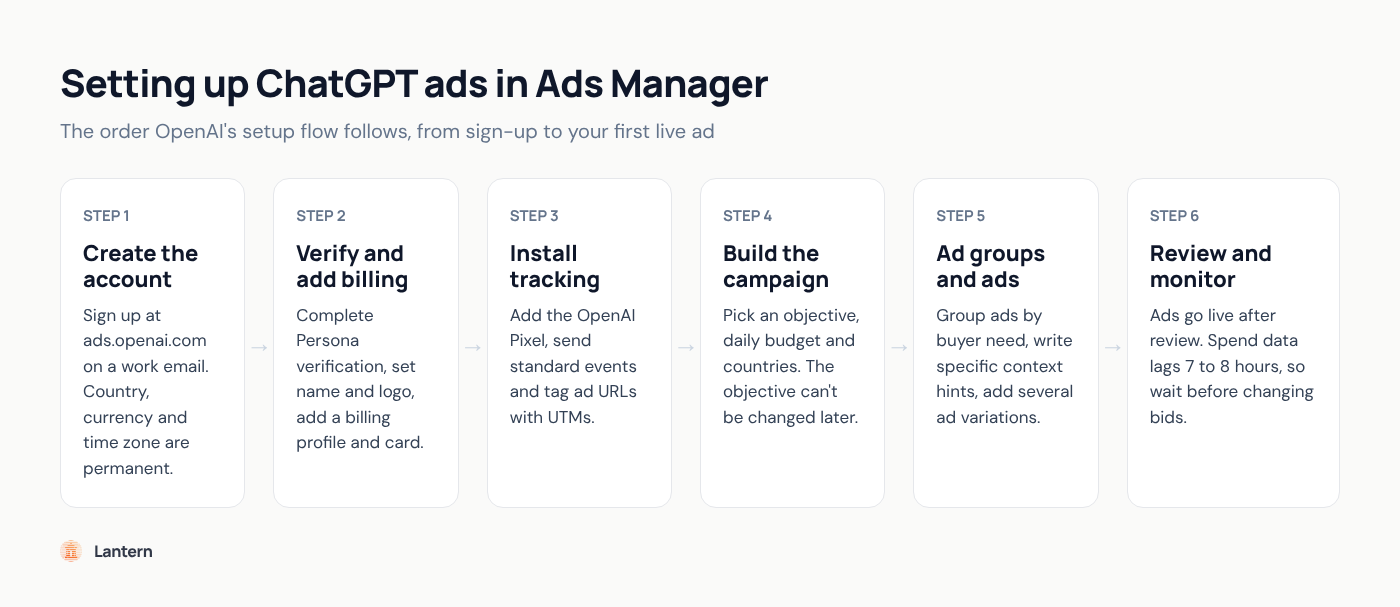
The setup runs in a fixed order: account, verification, billing, tracking, then campaign, ad group and ad. Campaigns won't deliver until every account step is complete.
Step 1: Create your advertiser account
Go to ads.openai.com, sign in with an OpenAI account on your work email (or create one), and enter your business name, website, logo, industry, country, currency and time zone. Double-check the last three: they can't be changed after the account is created.
Step 2: Complete verification and wait for review
Answer the verification questions through Persona while OpenAI checks that your offer is eligible under its ad policies. Your account then joins a rolling review queue, and the creator gets an email when access is ready. Don't submit a second application: OpenAI says duplicates don't speed anything up.
Step 3: Finish account info, billing and team access
In Settings, Account info, confirm the name and logo exactly as they should appear in your ads. Then add a billing profile and a card that match your account's country, and invite teammates under Settings, Users.
Billing is postpay: you're charged when unpaid spend hits a payment threshold, plus any balance at month end.
Step 4: Set up conversion tracking before your first campaign
Create a data source under Conversions and install the OpenAI Pixel (details in the tracking section below). Do this first: the Conversions objective needs at least one supported standard event, and you can't switch an existing campaign to it later.
Step 5: Create the campaign
Per OpenAI's article on creating campaigns, you set:
- Objective. Views, Clicks or Conversions (see the billing table below). Conversions campaigns are never billed per conversion, and you can't change the objective later.
- Budget. Daily or campaign-total. A daily budget is an average over a Sunday-to-Saturday week: one day can spend up to twice it, but the week won't exceed seven times it. The minimum is $25 a day in the US (€15, £15, and set amounts in other currencies).
- Countries. To run only in the US, explicitly include the United States. Excluding other countries is not enough. Sub-national targeting (states, cities, postal codes) is offered for non-feed campaigns in some countries.
- Platforms (optional). Android and iOS apps, mobile web and desktop web.
- Custom audiences (optional). Including an audience requires at least 25,000 matched users. Exclusions can be smaller. Skip audiences for EEA and Swiss campaigns, where ads personalization isn't available.
Step 6: Build ad groups and write context hints
An ad group is a set of ads around one theme or customer need. Make a new one whenever a use case needs different messaging or a different landing page, like a plumber splitting emergency repairs from maintenance.
Each ad group gets context hints: short, natural phrases that tell ChatGPT's systems when your ads may be relevant. OpenAI's guide to writing context hints contrasts the vague "running shoes" with "cushioned everyday running shoes for beginners training for their first 5K". They are not exact-match keywords, and they can't act as delivery rules: "Residential plumbing services available in Chicago" is fine, "Show this ad only to people in Chicago" is not.
Then pick a bid strategy: Maximize results (the default, which sets bids for you) or Manual max bid.
Step 7: Create your ads
Each ad has a title, copy, a square image and a landing page. OpenAI's launch checklist recommends titles of 16 to 24 characters (50 maximum) and copy of 32 to 48 characters (100 maximum). Images must be public, square, PNG or JPG, and no larger than 1200 x 1200 pixels.
Write several ads per group, each with a different angle, and send each to the most relevant page, not your homepage, with UTM tags on the URL.
Step 8: Submit for review and launch
Ads go live once they pass review, provided verification, billing, budget and dates allow delivery. Check the campaign is Active and ads show "Serving". If an ad shows "Not serving", hover over the status to see why, then edit and resubmit.
Step 9: Watch the first days without overreacting
Impressions, clicks and click-through rate refresh about every 15 minutes, but spend can lag 7 to 8 hours, so early $0 spend doesn't mean nothing was charged. OpenAI says to wait 24 hours before reporting zero delivery. Also note that ads may run for up to 24 hours after a pause, and that spend is billable.
How to set up product feed campaigns for ecommerce
Product feed campaigns turn your catalog into product ads with images, titles, prices, sale prices, star ratings and brand. OpenAI describes them as a beta for retail advertisers with broad or frequently changing catalogs.
What to know before you build one:
- Upload method. Use a CSV or TXT file to get started, a hosted HTTPS URL for a stable catalog, or SFTP for automated server-to-server uploads.
- Expiry. Feed items expire after two weeks, so OpenAI recommends a hosted URL or automated SFTP over manual uploads.
- Selecting products. Add custom labels in each product's
ads_metadatafield (for example,bidding_tier), then use product filters in each ad group. - Targeting. New feed campaigns support country-level targeting and exclusions only.
- Approval counts. "Not approved" is shown as a total, with no item-level reasons, so check titles, images and landing pages before launch.
- Shopify. A ChatGPT Ads app for Shopify syncs your catalog and installs the Pixel. As of October 2026, it's available to Shopify customers in the US.
Feed products are ads-only during the beta and don't appear in organic conversations. For the organic shopping side, see what changed with ChatGPT Instant Checkout.
Which objective and bid should you choose?
Start with Clicks if you're new and tracking isn't proven yet. Move to Conversions once your Pixel is reporting events reliably. Use Views when awareness is the real goal.
| Objective | You pay for | Bid control | Best for |
|---|---|---|---|
| Views | Every 1,000 impressions (CPM) | Max CPM per ad group | Awareness and launches |
| Clicks | Each valid click (CPC) | Max CPC; OpenAI suggests starting at $3 to $5 | First campaigns and traffic tests |
| Conversions | Valid clicks (oCPC) or impressions (oCPM) | Bid cap per conversion | Accounts with working conversion tracking |
OpenAI doesn't publish a rate card; prices come from a relevance-weighted, second-price auction. For context, Digiday reported that CPMs fell from $60 at launch to as low as $25 for some pilot advertisers, as Search Engine Journal summarized in April 2026.
How to track conversions from ChatGPT ads
Install the OpenAI Pixel, send standard events, add the Conversions API for server-side events if you can, and tag every ad URL with UTMs. Here's how it fits together, per OpenAI's conversion measurement article and developer docs:
- Pixel. Create a Pixel ID in the Conversions tab, paste the snippet near the top of the page head, and call
oaiq("measure", ...)with a standard event. Setdebug: truewhile testing to see Pixel activity in the browser console. - Standard events. These include
page_viewed,contents_viewed,items_added,checkout_started,order_created,lead_created,registration_completed,appointment_scheduled,subscription_createdandtrial_started. App events go through the Conversions API only. - Click reference. OpenAI appends a parameter called
opprefto your landing page URL. Keep it intact through redirects, and pass it with server-side events. - Deduplication. If you send the same conversion from the Pixel and your server, use the same
event_idin both. OpenAI keeps the first one. - GA4. A Google Analytics 4 connection is in beta (ask your account manager). It imports aggregate, property-wide data, so it isn't a campaign conversion count.
Two gotchas. A conversion shows 0 if its event name doesn't exactly match what the campaign is set to, and old events won't backfill after you fix it. And OpenAI's review crawlers may visit your landing pages with your tracking parameters, so analytics tools may log those visits as paid traffic even though they aren't billed clicks.
Expect Ads Manager and your analytics to disagree a little. To judge results beyond last click, see whether brands can prove value on ChatGPT ads, and to see organic ChatGPT traffic next to paid, use our guide to AI referral traffic and GA4 tracking.
ChatGPT ads launch checklist
Run through this before you submit. Every item comes from OpenAI's docs.
| Check | How to confirm | If you skip it |
|---|---|---|
| Account name and logo set | Settings, Account info | Ads won't serve |
| Verification approved | No verification banner in Ads Manager | Ads won't serve |
| Billing profile and valid card | Billing settings show a payment method | "Not serving" after a failed charge |
| OAI-AdsBot can reach landing pages | robots.txt, firewall and CDN rules | Ads fail review |
| Pixel firing the right event | Browser console with debug on | Conversions show 0 |
| UTMs on every ad URL | Click a test link and check the URL | No paid ChatGPT data in analytics |
| Countries explicitly included | Campaign location settings | Ads run in countries you didn't intend |
| Budget and dates allow delivery | Campaign settings | No delivery |
| Copy within limits | Title 50 max, copy 100 max | Upload errors |
| Category allowed in each target country | OpenAI ad policies | Rejection or no delivery abroad |
Your first 30 days: a ChatGPT ads test plan
This is our recommended approach, not an OpenAI requirement. The goal is a clear yes or no within a month, on a fixed test budget.
- Days 1 to 7: launch small and wait. Run one Clicks campaign with two or three ad groups, each built around a distinct buyer need, with three or four ads each. Use a daily budget and leave bids alone, since spend data lags and budgets pace across the week.
- Days 8 to 14: fix the obvious. Compare delivery, click-through rate and on-site behavior by ad group using your UTMs. Sharpen vague context hints, pause the weakest ads and add new angles.
- Days 15 to 21: add conversions. If your Pixel is recording your main event, start a separate Conversions campaign for your best ad group (remember, you can't switch the objective on the old one). Pick an event that happens often enough to give the system signal.
- Days 22 to 30: compare and decide. Work out cost per conversion yourself (spend divided by conversions) and compare it with your paid search numbers for the same offer. Watch for lifts in branded search and direct traffic, then decide whether to scale, keep testing or stop.
OpenAI says there are no cross-advertiser benchmarks yet, so judge results against your own channels, not against numbers from someone else's account.
Common mistakes and why ChatGPT ads get rejected
Most rejections come from the landing page, the category or a mismatch between ad and page. These are the most common problems in OpenAI's troubleshooting and policy docs:
- Blocking OpenAI's bots. If OAI-AdsBot can't load your page, the ad can't be reviewed. There's no manual bypass, so fix access and resubmit.
- Advertising a restricted category in the wrong country. Financial and health services are restricted to approved advertisers in the US and generally prohibited elsewhere. Legal services are US-only and need a license. Credit repair, debt relief, payday loans and telehealth are not allowed anywhere.
- Claims the page can't back up. OpenAI's ad policies ban unfounded claims about capabilities, pricing, outcomes, affiliations or comparisons, and require ads to be clearly distinguishable from ChatGPT's own interface.
- A different domain than your verified business. Using a destination on another domain can require approved verification, and domains that don't match your advertiser identity can be rejected.
- Excluding countries instead of including one. Selecting all countries and excluding some still lets ads run everywhere else.
If you think a rejection is wrong, use the Appeal or Request Review option in Ads Manager. OpenAI says appeals are the fastest route, and to email ads-support@openai.com only if no appeal option exists or an appeal has been pending more than seven days.
How do ChatGPT ads relate to organic ChatGPT visibility?
They're separate systems. OpenAI says ads don't influence ChatGPT's answers, so paying for ads won't get your brand mentioned, cited or recommended in the answer itself.
That matters, because the answer above your ad shapes how buyers see your category first. Research from Lantern (asklantern.com), the AI marketing platform for AI search visibility, found that third-party sites made up 98.9% of ChatGPT source links for the emerging brands it tracked, in The AI Recognition Gap. Your organic presence depends mostly on what other sites say about you, not on your ad account.
So treat them as two jobs: ads buy a placement below the answer, and organic work earns a place in it. Our guide on how to rank in ChatGPT covers the organic side, and tracking your brand mentions in AI search shows where you stand. For how paid and organic interact, read AI search ads are here.
One crawler fix helps both: OpenAI recommends allowing OAI-SearchBot for ads because it helps OpenAI understand public web content. Our ChatGPT ranking guide recommends allowing it for organic visibility too, so one check supports both plans.
Running ChatGPT ads with Lantern
If you're setting up one campaign yourself, Ads Manager is all you need. Lantern fits teams that want ChatGPT ads handled alongside their organic AI search work.
Lantern Pro ($89/month) includes ChatGPT ads, described on the pricing page as "prepare and manage ads in ChatGPT". The Advertising Agent, one of Lantern's marketing agents, plans, creates and manages campaigns for AI advertising surfaces using your brand context. Your team still approves campaigns and spend before anything goes live.
To see how ChatGPT describes your brand before you spend a dollar on ads, get a free AI Visibility Report. You can also try Lantern on the free plan, which covers ChatGPT analytics and 10 Agent Runs a month (ChatGPT ads need Pro).
Frequently asked questions
How do I get access to ChatGPT Ads Manager?
Go to ads.openai.com, sign in or create an OpenAI account with your work email, and complete onboarding and verification. Access depends on your country: the legal entity that's billed must be in one of the 89 supported countries. If your country isn't listed yet, you can still sign up and OpenAI will notify you when access opens.
What is the minimum budget for ChatGPT ads?
The minimum daily budget is $25 in the US, €15 in euro markets and £15 in the UK. Because a daily budget is a weekly average, one day can spend up to twice that. OpenAI's setup docs list no minimum spend commitment for self-serve.
How long does ChatGPT ads approval take?
OpenAI doesn't publish a fixed time for ad review. Business verification can take up to seven business days, and account review runs in a rolling queue.
Can an agency run ChatGPT ads for clients?
Yes, but each advertiser needs its own ad account, and each new account needs a different email address. One person can be invited to several accounts as a member or an administrator, so an agency team can work across client accounts.
Why is my ChatGPT ad not serving?
Hover over the "Not serving" status to see the reason. Common causes are a policy rejection, a landing page that blocks OpenAI's crawlers, incomplete verification or billing, a failed payment, a spent weekly budget or a passed end date.