AI Crawlers Do Not Render JavaScript
AI Crawlers Do Not Render JavaScript: What GPTBot, ClaudeBot, and PerplexityBot Actually See
On this page
On this page
There is a technical assumption embedded in most marketing and engineering teams that is quietly costing brands their AI search visibility.
The assumption is this: if Google can crawl and render our site, AI crawlers can too.
It is wrong.
The gap between what Googlebot does and what AI crawlers actually do is where a significant portion of AI citation invisibility originates. Understanding it and closing it is one of the highest-leverage technical moves a marketing team can make in 2026.
Lantern's monitoring data shows that AI-referred visitors convert at 14.2% versus 2.8% for standard Google clicks. The traffic quality from AI engines is transformational. The prerequisite for capturing any of it is that AI crawlers can actually read your content.
What AI Crawlers Actually See
When GPTBot, OAI-SearchBot, ClaudeBot, or PerplexityBot fetches a page, it receives the raw HTML response before any JavaScript executes.
For a traditional server-rendered site, that raw HTML contains the full page content: headings, body copy, structured data, schema markup, internal links. Everything an AI engine needs to understand, trust, and cite the page.
For a modern single-page application or a heavily client-rendered site, the raw HTML frequently contains:
- A page shell with an empty
<div id="app"></div> - Script bundle references
- Minimal metadata
- Boilerplate navigation
- No meaningful body content
The actual content, product descriptions, feature comparisons, documentation, pricing context, FAQ answers exists only in the rendered DOM after JavaScript executes. AI crawlers that do not execute JavaScript never see it.
The scale of the evidence is now conclusive. An analysis of over 500 million GPTBot fetches found zero evidence of JavaScript execution. Even when GPTBot downloads JavaScript files which it does approximately 11.5% of the time it does not run them. Vercel's large-scale analysis of crawl behavior across Next.js applications and traditional web stacks confirmed the same pattern across every major AI crawler tested.
As of June 2026: none of the major AI crawlers render JavaScript. This includes GPTBot, OAI-SearchBot, ChatGPT-User, ClaudeBot, Claude-SearchBot, PerplexityBot, Meta-ExternalAgent, and Bytespider.
The one meaningful exception is Google Gemini, which leverages Googlebot's Web Rendering Service infrastructure and can execute JavaScript with the same caveats around timing, resource blocking, and rendering queue delays that apply to Googlebot itself.
The Training vs. Retrieval Distinction That Changes Everything
The original version of this post treated AI crawlers as a single category. They are not. Understanding the distinction between training crawlers, retrieval crawlers, and live user-fetch agents matters for both technical configuration and business strategy.
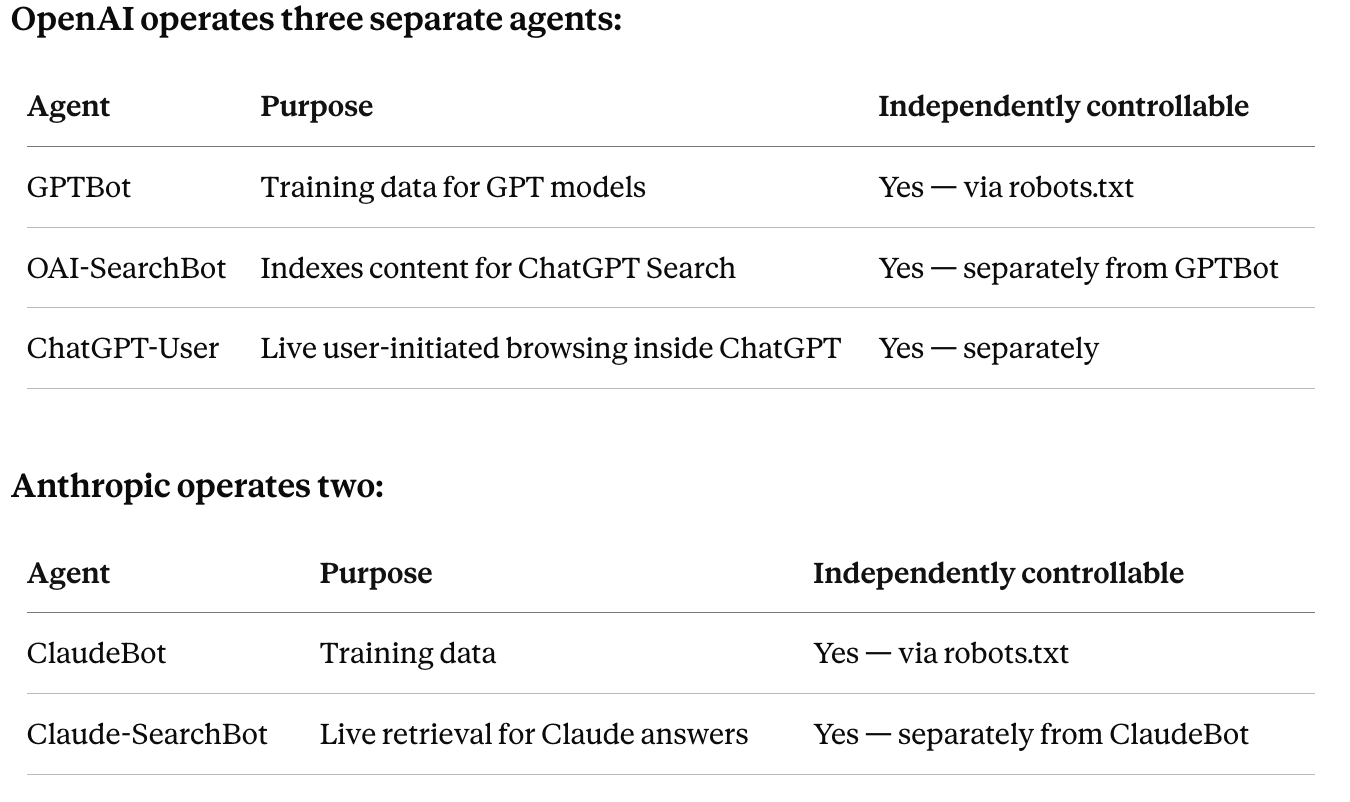
The strategic implication is significant. An operator who wants to appear in ChatGPT Search and Claude answers without contributing content to foundation model training can allow OAI-SearchBot and Claude-SearchBot while disallowing GPTBot and ClaudeBot. This is a real strategic choice that most teams have not yet made deliberately.
None of these agents training or retrieval execute JavaScript. The rendering gap applies across all of them.
One additional layer: approximately 92% of ChatGPT's web-search responses draw on Bing's search index rather than direct GPTBot crawl data. Bingbot has limited JavaScript rendering capability. A fully client-side rendered application risks being invisible in both the Bing index and direct AI crawler fetches simultaneously cutting off ChatGPT Search visibility from two directions at once.
Why Google Rankings Don't Predict AI Citations
Technical SEO teams that have solved JavaScript rendering for Google cannot assume the problem is solved for AI crawlers. The two situations are not equivalent.
Google has invested years and substantial infrastructure into rendering JavaScript at scale. Googlebot's Web Rendering Service queues pages for JavaScript execution, processes them, and eventually indexes the rendered content though with delays that can affect crawl budget and freshness.
In March 2026, Google officially removed its longstanding JavaScript SEO warning from its developer documentation, reflecting that Googlebot's rendering is now genuinely mature. That change is accurate and well-founded. It applies only to Google.
AI crawlers have made no equivalent investment. They are optimized for a different task retrieving content to inform answer generation and their crawling behavior reflects that purpose. The practical result:
- A site that resolved its Google rendering issues through dynamic rendering specifically for Googlebot may still be serving AI crawlers an empty HTML shell if those crawlers are not included in the rendering logic.
- A page that ranks on the first page of Google and converts visitors can be completely absent from AI-generated answers.
- These two facts coexist silently, which is why the problem compounds before most teams notice it.
The Pages Most at Risk
Not all pages carry equal risk. The pages where JavaScript rendering limitations cause the most AI search damage are the ones with the highest citation value.
Product and feature pages. ChatGPT cites product pages at 20.1% of all citations according to Lantern's data. If your product pages load their core descriptions, specifications, and pricing via client-side JavaScript, the engine most likely to cite them directly cannot read them. Product pages are also the pages AI-referred visitors land on when they convert at 14.2%.
Comparison and alternative pages. Comparison content earns 9.3% of all AI citations and carries disproportionate purchase-intent value. A comparison table rendered client-side is invisible to AI crawlers the content most likely to influence a buyer in active evaluation is the content most at risk.
Documentation and FAQ pages. AI engines heavily favor structured Q&A content for informational and evaluation queries. FAQ pages and documentation that render their content via JavaScript are underperforming their citation potential regardless of how well they are written. Lantern's Site Audit identifies pages where JavaScript dependency is the likely cause of citation underperformance.
Category and landing pages. These pages establish topical authority signals that AI engines use to evaluate a brand's expertise. If substantive content on these pages is client-rendered, that authority signal is weakened or absent.
Your highest-traffic pages. Domain traffic is the strongest predictor of AI citations high-traffic sites earn 3x more citations than low-traffic equivalents. But traffic only amplifies what AI crawlers can access. If your highest-traffic pages are client-rendered, traffic volume does not translate into citation volume.
How to Test Whether AI Crawlers Can Read Your Site
Do not assume. Test directly using methods that approximate what AI crawlers actually receive.
View Source test. Open any critical page in your browser and select View Source not Inspect Element, which shows the rendered DOM, but View Source, which shows the raw HTML response. Scan the raw HTML for your primary heading, body copy, product descriptions, FAQ content, and internal links. If they are absent from View Source but visible in the rendered page, you have a rendering gap.
JavaScript-disabled test. Load the page with JavaScript disabled in your browser settings. If the page becomes an empty shell or loses its substantive content, AI crawlers are likely seeing the same empty version.
cURL test. Run a cURL request against the page URL from the command line. The response is the raw HTML exactly as most bots receive it on their first fetch. Check it for content completeness.
curl -A "Mozilla/5.0" https://your-domain.com/your-page
Server log analysis. Review your server logs for visits from GPTBot, OAI-SearchBot, ClaudeBot, Claude-SearchBot, and PerplexityBot. A pattern of AI crawler visits to pages with thin raw HTML is a direct signal of rendering-related visibility loss. Searching for the following strings catches most major AI agent traffic:
GPTBot|OAI-SearchBot|ChatGPT-User|ClaudeBot|Claude-SearchBot|PerplexityBot
Lantern's Site Audit surfaces rendering-related visibility gaps automatically identifying pages where JavaScript dependency is likely reducing AI crawler access and flagging them alongside citation performance data. The connection between the technical problem and the business outcome is visible in a single dashboard rather than requiring manual reconciliation across crawl tools, server logs, and analytics.
The Technical Fixes
The goal is not to abandon modern frameworks. It is to ensure the content AI engines need to cite your site is delivered in a form they can reliably consume.
Server-side rendering (SSR). SSR sends meaningful HTML from the server before any JavaScript executes. For content-heavy pages documentation, product detail pages, editorial content, category pages SSR is the cleanest and most comprehensive fix. The entire page content is available in the raw HTML response, eliminating the rendering gap entirely.
Prerendering. For sites where full SSR is architecturally complex, prerendering generates static HTML snapshots that are served to bots while users continue to receive the full JavaScript-powered experience. Prerendering is particularly effective for marketing pages, evergreen resources, and framework-driven sites with limited dynamic personalization requirements. One case study found that after enabling prerendering for a single-page application, AI bots accounted for nearly 48% of all page requests showing how quickly AI crawlers begin fetching and processing content once it becomes accessible in the initial HTML response.
Static site generation (SSG). For content that is stable and does not require dynamic personalization, static generation produces fast, fully crawlable HTML with minimal rendering dependencies. Blog content, documentation, and resource pages are strong candidates.
Hybrid rendering with HTML-first content. For pages requiring dynamic functionality alongside static content, deliver the substantive content headings, body copy, product descriptions, FAQs, pricing context in the initial HTML response, and layer dynamic enhancements on top via JavaScript afterward.
A reliable rule: if the content matters for citation, trust, or conversion, it belongs in the initial HTML.
robots.txt configuration. Ensure your critical pages are accessible to all relevant AI crawlers. The minimum configuration for AI search visibility:
User-agent: GPTBot
Allow: /

User-agent: OAI-SearchBot
Allow: /

User-agent: ChatGPT-User
Allow: /

User-agent: ClaudeBot
Allow: /

User-agent: Claude-SearchBot
Allow: /

User-agent: PerplexityBot
Allow: /

User-agent: Google-Extended
Allow: /
If you want to appear in AI answers without contributing to model training, allow the retrieval crawlers (OAI-SearchBot, Claude-SearchBot) while separately controlling the training crawlers (GPTBot, ClaudeBot).
What Readable HTML Must Contain
Once the rendering architecture is correct, the initial HTML response for every high-value page should contain the following:
- Primary H1 with a specific, descriptive claim not a generic keyword
- Opening answer paragraph that directly answers the page's primary query in 40–60 words. Research shows 44.2% of all ChatGPT citations come from the first 30% of a page's content. Every section needs a self-contained answer capsule before supporting detail.
- Core body copy with specific outcome language numbers, named entities, concrete claims
- Comparison tables in HTML
<table>format. AI models extract HTML tables almost verbatim. Never write comparison data as prose. - FAQ sections with specific Q&A pairs. FAQ sections serve double duty: they match the question-answer format AI models prefer, and they provide FAQPage schema that AI can extract directly.
- Author and date signals visible name, credentials, publication date, and last-updated date. These are direct EEAT signals that both Google and AI engines use to evaluate content trustworthiness.
- Pricing context where appropriate AI engines cite pricing pages more when pricing is delivered in raw HTML
- Internal links to related pages including Lantern's AI Visibility monitoring, Citation tracking, and Site Audit documentation, and related Lantern posts like Site Audit Signals That Matter for AI Search and Why Your Old Content Is Losing AI Citations
- Canonical tag and metadata in the
<head>never injected by JavaScript - Structured data schema (JSON-LD) as a supporting layer alongside visible text
On schema markup: it reinforces visible content it does not replace it. AI crawlers extract meaning from the visible text of a page first. A page with excellent schema but thin visible content is not a well-optimized page for AI citation purposes. Schema markup placed in <script type="application/ld+json"> tags in the <head> is accessible to AI crawlers without JavaScript execution.
On llms.txt: the 2025 version of this post treated llms.txt as a reliable complementary layer. The 2026 picture is more nuanced. As of June 2026, llms.txt is not confirmed to have material effect on AI retrieval behavior by any major platform. It remains a useful signal of intent and may develop further but it is not a substitute for accessible raw HTML. Fix the rendering architecture first.
Measuring the Impact with Lantern
The rendering gap is invisible in most standard analytics setups. A page can appear healthy in Google Search Console ranking well, receiving impressions, generating clicks while being completely absent from AI-generated answers because its content is unreachable by AI crawlers.
Lantern's Search Console integration surfaces GSC performance data directly alongside AI citation data, so you can see both signals in one view. Pages with strong Google performance but low AI citation rates are the first place to look for rendering gaps.
The measurement layer that makes this visible is AI citation monitoring tracking which pages on your site are being cited in ChatGPT, Perplexity, Gemini, and Claude responses, and correlating citation rates with the rendering characteristics of those pages.
Two distinct failure patterns emerge:
- Pages with server-rendered content that are not being cited despite strong topical authority a content quality or structure problem. The fix is content: add answer capsules, FAQ sections, comparison tables, and specific data.
- Pages with client-rendered content that are not being cited a rendering problem. The fix is technical: SSR, prerendering, or SSG.
The distinction matters because the fixes are completely different. Lantern's AI Visibility Score a 0–100 measure of how prominently your brand appears in AI-generated responses combined with the Site Audit's rendering gap detection, makes this diagnosis automatic.
If your AI Visibility Score is rising but AI referral traffic isn't, it suggests AI models mention you but don't link to you a content and structured data problem worth investigating separately from the rendering issue.
Key Takeaways
- 500 million+ GPTBot fetches. Zero evidence of JavaScript execution. The hedged language from early 2026 is no longer necessary. AI crawlers do not render JavaScript.
- Train vs. retrieve is a real distinction. GPTBot, ClaudeBot, and their equivalents are training crawlers. OAI-SearchBot, Claude-SearchBot, and ChatGPT-User are retrieval crawlers. They are independently controllable. Most teams have not made this choice deliberately.
- Google's JavaScript SEO progress does not transfer. Google dropped its JS SEO warning in March 2026 because Googlebot's rendering is mature. That fact applies only to Google. It is not a green light for client-side rendering across AI search.
- 92% of ChatGPT Search responses draw on Bing's index which has limited JS rendering. A client-rendered SPA loses ChatGPT Search visibility from two directions simultaneously.
- The highest-citation-value pages are also the highest-risk pages product pages (20.1% of AI citations), comparison pages (9.3%), and FAQ/documentation pages. These are the ones most likely to be client-rendered in modern stacks.
- View Source is your fastest diagnostic. If your content is not in the raw HTML, it is not being cited.
- SSR, prerendering, and SSG are the fixes. The correct approach depends on the content type and dynamic requirements of each page.
- Schema reinforces visible content it does not replace it. JSON-LD in the
<head>is accessible to AI crawlers. Schema over thin HTML does not produce citations. - llms.txt has no confirmed material effect on AI retrieval in 2026. Fix the rendering architecture first. llms.txt can follow.
- Separate rendering problems from content quality problems. Lantern's AI citation monitoring and Site Audit distinguish the two and point directly to which pages need a technical fix versus a content fix.
Lantern monitors your AI search visibility across ChatGPT, Perplexity, Gemini, and Claude, and connects citation performance directly to technical audit data. Start your free trial at asklantern.com.