How to Optimize WordPress Sites for AI Search Visibility
AI search is reshaping how consumers discover and purchase products. Instead of scanning traditional search results, users increasingly rely on generative AI tools such as ChatGPT, Perplexity, Gemini, Claude, and Google AI Overviews to get recommendations.
On this page
On this page
AI search is reshaping how consumers discover and purchase products. Instead of scanning traditional search results, users increasingly rely on generative AI tools such as ChatGPT, Perplexity, Gemini, Claude, and Google AI Overviews to get recommendations.
This shift is already measurable. As of November 2025, ChatGPT accounted for more than 84% of AI-driven referral traffic, growing over 3× year over year. Beyond just driving traffic, AI is changing how consumers make purchasing decisions. The 2026 Marketplace Shopping Behavior Report found that 58% of consumers have used AI tools to research products, showing that AI search is now part of the path to purchase.
For most brands, this new discovery layer leads back to their website, and in many cases, that website runs on WordPress, which powers 42.8% of all websites worldwide as of January 2025. But without optimization, most of these WordPress sites can’t be found or cited by AI models, even when they contain relevant, high-quality information.
If your WordPress product pages are not AI-friendly, you will be invisible to users looking for answers online.
This article explores how Lantern’s WordPress integration connects your site content to AI search systems to make you visible on AI-generated answers.
What is WordPress AI Search Optimization?
WordPress AI search optimization involves preparing WordPress sites to be discovered, interpreted, and cited by AI-powered search and answer engines such as ChatGPT, Google AI Overviews, Copilot, and Perplexity.
Unlike traditional SEO, which focuses on Google rankings and clicks, AI search optimization prioritizes content structure, site signals, and visibility metrics that help AI systems understand which pages to surface when generating answers.
In practice, this optimization is enabled through tooling that connects WordPress content to AI search workflows. A WordPress plugin for AI search visibility provides this extra layer of connection.
Why WordPress Sites Struggle With AI Search Visibility
Here’s why your WordPress site is not showing up inside AI-generated answers:
Lack of Technical Skills
To get your website ready for AI search, you require a combination of content, performance, and technical signals working together, among them:
- Schema markup
- Server-side rendering
- Structured data
- Clear content structure
- Sitemap optimization
- Optimized site speed
- Accurate and fresh content
- Image optimization
AI crawlers recognize WordPress sites that have this in place. However, most marketers and non-technical teams lack developer expertise to implement this level of optimization or manage technical files. Teams wait weeks for developer resources while competitors already appear in AI responses.
Missing AI-Ready Site Signals
Traditional SEO focuses on keywords, backlinks, and structured data for Google’s index. On the other hand, AI models prioritize AI-readable content and signals that tell them what information is authoritative and extractable.
Many WordPress themes and templates lack machine-readable structures and semantics optimized for generative engines.
Manual Optimization
If you want to create AI-friendly content, you must understand query patterns and structured information that ChatGPT, Perplexity, or Claude cite. For instance, Google Overviews provide quick summaries at the top of the search results.
It draws this information from websites that offer concise answers near the top of sections, as well as well-structured lists, tables, and definitions.
Manually optimizing your WordPress site to meet these requirements can overwhelm small teams without a developer.
How to Optimize WordPress for AI Search Visibility
Start by connecting your WordPress site to an AI visibility platform like Lantern using the Lantern WordPress plugin. This connection links your content and site signals directly to Lantern’s AI search analytics, allowing you to see how AI assistants discover, summarize, and cite your pages across ChatGPT, Perplexity, Gemini, and Google AI Overviews from a single dashboard.
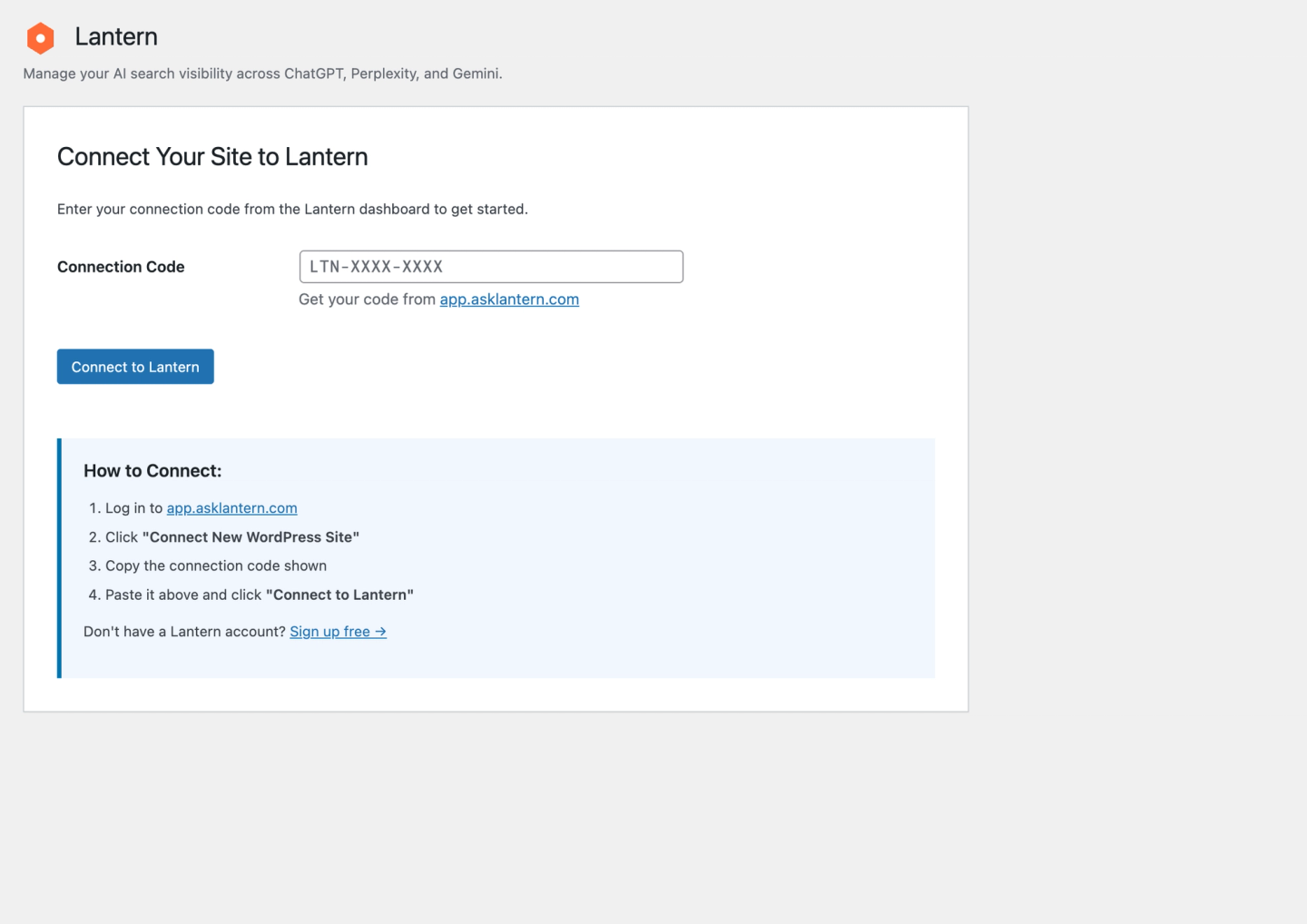
Once connected, teams can:
- Track which posts and pages are surfaced and cited in AI-generated answers.
- Monitor visibility trends across AI platforms
- Publish AI-optimized content blogs from Lantern Content Studio directly into WordPress without copy‑pasting.
Structure Content for Answer Engines and Generative Engines
To perform well in AEO and GEO, your WordPress content needs to be easy for models to extract and reuse.
- Use clear H2/H3 headings that often mirror real questions.
- Lead important sections with a 1–2 sentence direct answer (40–60 words) before adding detail.
- Add rich FAQ blocks and step-by-step How-To sections where appropriate, then mark them up with FAQPage and HowTo schema so AI systems can reliably pull answers and instructions.
- Keep paragraphs short and use bullet lists and tables; answer engines frequently lift these verbatim into featured responses.
Use Data to Improve Content and Technical Signals
Optimization requires measurements. Use visibility data, such as citation rates and overall web crawl counts, to identify high-performing topics and content formats that AI engines favor. This data-led strategy allows you to tailor new WordPress posts for AI discovery.
How Lantern’s WordPress Integration Closes the Gap
Lantern is an AI search analytics platform that helps WordPress users improve visibility in AI-generated answers across ChatGPT, Perplexity, Claude, Copilot, Google AI Overviews, and other major AI models. Lantern tracks brand mentions, citations, sentiment, and AI search traffic so marketing and product teams can optimize their WordPress visibility.
With this WordPress AEO plugin, you can automate optimization tasks that previously required manual audits, code changes, or developer support, allowing teams to operationalize AI search optimization inside their existing WordPress environment.
Here are the key features you get from Lantern:
Real-Time Site Status and AI Readiness
Lantern’s WordPress integration lets teams assess whether the WordPress site is missing critical signals, such as schema markup or structured data that prevent content from being cited in AI-generated answers. This feature enables content managers to spot which areas need immediate optimization.
Site Audit and Implementation
Lantern automatically creates and manages AI-related technical files via WordPress API connections. The sitemaps and structured data templates deploy without manual coding. Content teams move from concept to publication without waiting for developer availability.
Content API & Publishing Workflow
The content API on Lantern provides insights derived from top-cited pages across ChatGPT, Claude, Perplexity, and Google AI Overviews. The system reveals which content structures, heading hierarchies, and answer formats AI systems prefer when responding to queries in your industry.
Writers can use this information to create content calendars and establish a publishing workflow with the proper structural signals and markup to meet AI visibility requirements. This workflow publishes content that’s ready for AI crawlers.
Lantern’s Content Studio now integrates directly with WordPress. Teams can generate AI-optimized content inside Lantern and publish directly to WordPress - no copy-paste, no workflow breaks.
Benefits of Using a WordPress Plugin for AI Search Visibility
Once you start using a WordPress AEO plugin, here are the benefits you should start seeing:
- Faster content publishing with built-in AI optimization: You want to publish AI-ready content in minutes. Automating the process eliminates multiple technical review cycles while maintaining content quality.
- Reduced dependency on external tools or developers: If you’re operating a small team, you could optimize resources by investing in a WordPress plugin that will optimize your content for search visibility. It will help you structure content and manage your site even if your team is non-technical.
- Clear performance insights: As a brand, you need to track AI visibility metrics showing citation frequency, share of voice in AI responses, and competitive positioning. With this data, you can see which content AI platforms reference and optimize accordingly.
- Alignment with next-generation search strategies. According to Semrush insights, ChatGPT received 5.21 billion visits in December 2025 highlighting that more consumers are relying on this new search frontier. Integrating your WordPress site with an AI analytics tool positions you to keep up with new trends.
Final Takeaway
ChatGPT, Claude, Perplexity, Gemini, and Google Overviews are becoming a significant referral channel. For your WordPress site to appear in the search results, you need to invest in AI visibility. The Lantern WordPress integration gives you this by connecting your platform to a publishing workflow and analytics platform that allows you to track mentions, citations, sentiment, and AI search traffic.
With that missing piece in place, you can optimize your WordPress site and make it discoverable to consumers online.